 The final stamp was produced the same way as the others, except two different images were used for the outer and inner background.
Tuesday, 12 January 2010
Panda stamp
The final stamp was produced the same way as the others, except two different images were used for the outer and inner background.
Monday, 11 January 2010
Finishing touches
 I completed the panda by adding ears and a nose. These were created out of squashed spheres. The ears had fur added to them and the nose was coloured black with a cellular bitmap.


Sunday, 10 January 2010
And finally......................................
back to the panda.
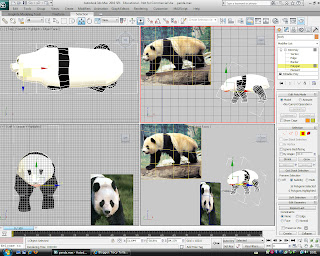

Using sub object mode I applied black and white material to the polygons. The eye area was inset then beveled inwards slightly and a sphere positioned in the socket and a black glossy texture with slight specularity applied. For the nose I extruded some polygons and split the edge of some polygons for the mouth. However on a quick render it shows that the head still needs a lot of work.


Thursday, 7 January 2010
stamp design
 Using the template of the fish design stamp in photoshop I replaced the background with the sky image and placed then final render in the centre.
bee and flower
 The material on the flower was completely redone as there were white marks along the edges of the petals, which altering the co-ordinates did not seem to be overly effective. I then moved the bee onto the flower. For the background I created a sky image in photoshop, made by filling it with a sky blue then using a large soft brush with an off white colour, lowered opacity and flow to craw out the clouds. This sky image was then mapped onto a plane using the material editor. Finally I added a spotligfht to the scene and after many faioed attempts eventually managed to place it so that the beee cast a shadow over the flower.
Tail end
 The individual polygons of the stripes were selected and an ID given to them. These were then coloured using a cellular bump map as I found this gave the best effect. The same dark material was added to the body and head sections. I then used the turbosmooth modifier before the hair and fur modifier. I found that by lowering the hair count and length it acheived a reasonable result. I then added the wings by cutting out the wings from an image in photoshop, creating a black and white outline of it and using the material editor to apply the images onto a plane, as in the leaf tutorial.
The antennae were created by cutting the top and bottom off a sphere then using the array tool to replicate it. The taper and bend modifiers were then applied before being copied and moved into place. Material was also added to the eyes, legs and antennae before being exported as an object and imported into the flower image.

stamp design
 I created the stamp by placing the final rendered image onto the bottom layerand using the clolne brush to remove the plant from the edge. I then drew out a white rectangle on another layer. Then on a third layer I placed the final image in the centre. I then selected the layer with the rectangle and used a small eraser brush to stamp out the sections on two of the sides. Each of these sides were then copied and rotated and used to replace the oppsite sides, which were selected using the rectangle selection tool and deleted. The queen's head was then placed in the corner and originally coloured bronze before adding the lens flare and emboss filters.
swim fishy swim
 Finally I added a fog effect in the render set up and coloured it a deep sea green/blue. The fish model was cloned as a copy, which was then rotated and moved further back in the scene. To create the plant I used a cylinder upon which I used the bend and taper modifier. This was then cloned several times using the array tool, then the whole section was selected and copied. I then moved these around the scene and changed the bend and taper settings on individual ones to give a more random look.
Lighting underwater scene

I added a direct spotlight and two omni lights. Using the tools>light lister to access all three lights I reduced the multiplier on the omni lights and ticked box to include shadows. The decay rate was changed to inverse and the start point lowered on the spotlight as I found this gave a better effect. The spotlight was also modified by adding volume light to the atmospheres and effects and a water texture image added to the projector map to create a caustic effect. The light colour was changed to a light blue, placed at an angle from above the scene and enlarged to cover a greater area.
Underwater scene
 To give the fish an environment more suited to it's needs I created an undersea scene. I placed a large flat cube at the base of the scene and added a noise modifier before adding a sand texture, which I created in photoshop by choosing a light and dark sandy colour with the render >clouds filter, followed by the noise filter and the the grain texturer
 .
.Gone fishing
 After spending probably way too long trying to resolve the issues I encountered with the fish I eventually gave up and started again from scratch. This time I was able to go through the modelling stages much quicker, but decided not to adjust the polygons to create the stripes instead just making it one colour with the additon of specular colour and changing the specular and glossiness levels in the material editor. A slightly glossy black material with specular highlights were added to the eyes.
Tuesday, 29 December 2009
Battered fish
I added on the back fins using bevel, extrude and move tools. An eye socket was created on one side with the extrude and bevel tools and a sphere placed into the socket for the eye and the attach tool used to hold it in place. For the front fin I used a plane, on the same side as the eye, which was formed by moving the vertices on the outside to form the basic shape and then using soft selection and the move and rotate tool to create a more rounded look. I then used the attach tool to hold the front fin in place.
To save trying to create the eye socket and fin on the other side I sliced the fish in half lengthways and deleted the half without the features. The remaining half was then mirrored and the two halfs attached together and the weld tool used to join the vertices.
Using polygon material ID, I mapped out the three main colour sections of the fish - black, orange and white. These basic colours where then added using the diffuse channel in the material editor.


To save trying to create the eye socket and fin on the other side I sliced the fish in half lengthways and deleted the half without the features. The remaining half was then mirrored and the two halfs attached together and the weld tool used to join the vertices.
Using polygon material ID, I mapped out the three main colour sections of the fish - black, orange and white. These basic colours where then added using the diffuse channel in the material editor.
The final thing was to use turbosmooth modifier prior to rendering, however when I did so it showed up extra vertices / polygons all over the fish, which showed up as holes when rendered. Poor fishy must be affected by the polution!
Images:
Top - screendump of fish with turbosmooth
Middle - render of fish with turbosmooth
Bottom - render of fish without turbosmooth.


Wednesday, 9 December 2009
Panda

Using 2 reference photos I re-shaped a cylinder for the bodyshape using the edit poly modifier, then using another cylinder with the edit poly modifier one of the legs was shaped. This was then copied 3x to create the other legs and each one moved into place.
Tuesday, 8 December 2009
Busy Bee

I've now given the bee some legs to walk about with until he get's some wings. One leg was created in sections using cylinders, a sphere and a torus. The sections were then attached to each other using the attch tool. The leg was then cloned 5 times and each leg rotated and moved into position
Sunday, 29 November 2009
Easy as 1, 2. Bee

Using the image on the planes for guidance, I modelled the head, body and tail of the bee. I used seperate objects for each one to represent the individual sections of a bee. The head and tail were both made from spheres whereas the body section was modelled from a cylinder.
Busy Bee

The bee was started in the same way as the fish, in that I created some drawings from a reference picture and applied these as material to planes in 3DS.


Wednesday, 25 November 2009
Swim fishy swim
 Using the edit poly modifier the cube was shaped to create the body and tail shape, leaving the fins to do next.
Another fishy story
 Screen shot in 3DS showing placement of planes with fish drawings. Modeling of fish was started by placing a cube into the scene, changing the properties to transparent, resizing and centering the cube to be in line with the drawings.
A fishy story

Using a reference image of a clownfish, I drew different viewpoints of the fish using Photoshop. These drawings were then placed onto planes in 3DS and arranged to give a basic outline of the fish shape.


Subscribe to:
Posts (Atom)